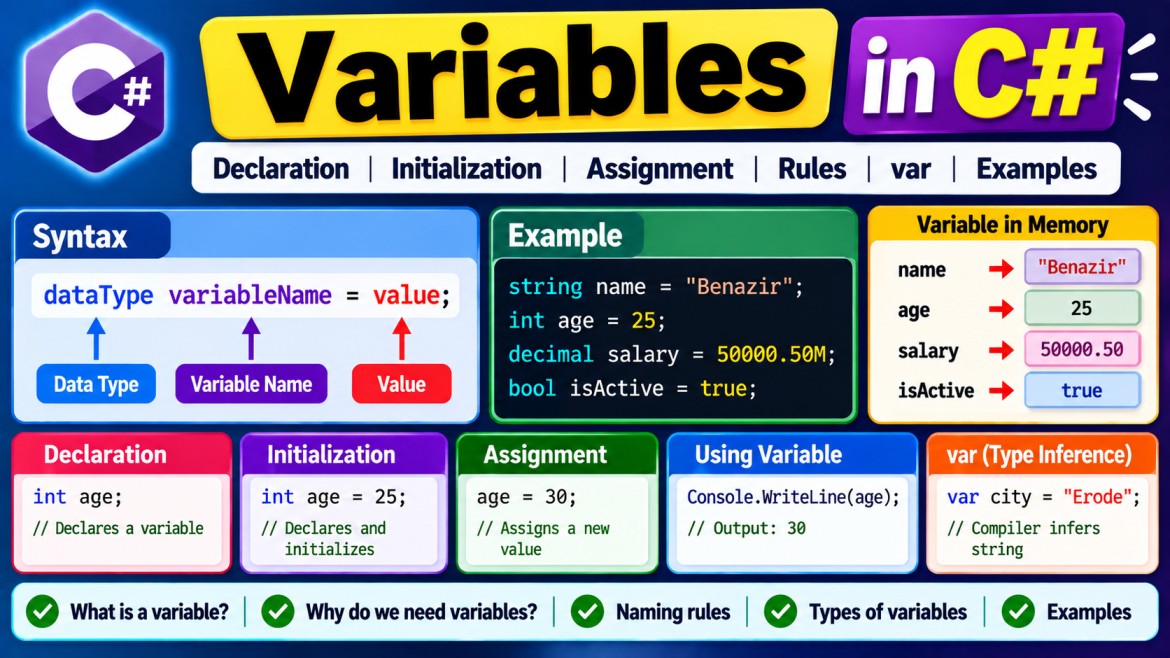


Variables in C#
A variable is a named storage location used to store a value that can be accessed or changed while a program runs.
For example:
string name = "Benazir";
int age = 25;
decimal salary = 50000.50M;
bool isActive = true;
Here:
name      → "Benazir"
age       → 25
salary    → 50000.50
isActive  → true
1. Why Do We Need Variables?
Without variables, we would have to repeatedly use fixed values.
Instead of:
Console.WriteLine("Benazir");
Console.WriteLine("Benazir");
Console.WriteLine("Benazir");
we can store the value once:
string name = "Benazir";

Console.WriteLine(name);
Console.WriteLine(name);
Console.WriteLine(name);
Variables make programs easier to:
- Store data
- Retrieve data
- Modify data
- Perform calculations
- Pass data between methods
- Avoid repeating values
2. Variable Syntax
The basic syntax is:
dataType variableName = value;Example:
string name = "Benazir";Breaking it down:
string      name       =      "Benazir";
  ↓           ↓        ↓           ↓
Data Type   Variable  Assignment   Value
             Name      Operator
Another example:
int age = 25;int age = 25;
↓ ↓ ↓ ↓
Type Variable Assignment Value
Name Operator3. Declaration
Creating a variable is called variable declaration.
int age;Here:
int → Data type
age → Variable name
We have declared the variable but haven't explicitly assigned a value.
For a local variable, C# requires you to assign a value before reading it.
This is invalid:
int age;

Console.WriteLine(age); // Compile-time error
4. Initialization
Assigning the first value when declaring a variable is called initialization.
int age = 25;This performs declaration and initialization together.
Declaration
   ↓
int age

Initialization
   ↓
age = 25
Combined:
int age = 25;5. Assignment
You can assign a new value later.
int age;

age = 25;
Here:
int age;    // Declaration

age = 25;   // Assignment
You can later change it:
age = 30;6. Variables Can Change
The word variable indicates that its value can vary.
int age = 25;

Console.WriteLine(age);

age = 30;

Console.WriteLine(age);
Output:
25
30
Conceptually:
Initially

age
┌────┐
│ 25 │
└────┘

After:

age = 30;

age
┌────┐
│ 30 │
└────┘
The old value is replaced.
7. Variable and Data Type
Every C# variable has a type.
string name = "Benazir";
int age = 25;
double percentage = 95.5;
decimal salary = 50000.50M;
char grade = 'A';
bool isActive = true;| Variable | Type | Value |
|---|---|---|
name |
string |
"Benazir" |
age |
int |
25 |
percentage |
double |
95.5 |
salary |
decimal |
50000.50M |
grade |
char |
'A' |
isActive |
bool |
true |
8. C# Is Strongly Typed
C# is a strongly typed language.
Once a variable has a particular compile-time type, you cannot simply assign an incompatible value to it.
For example:
int age = 25;This is valid:
age = 30;But this isn't:
age = "Benazir"; // Errorbecause:
age      → int
"Benazir" → string
The types aren't compatible.
9. Multiple Variables
You can declare multiple variables of the same type:
int age1 = 20;
int age2 = 25;
int age3 = 30;
C# also allows:
int age1 = 20, age2 = 25, age3 = 30;For readability, separate declarations are often preferable:
int age1 = 20;
int age2 = 25;
int age3 = 30;
10. Using Variables in Calculations
Variables are commonly used in expressions.
int firstNumber = 10;
int secondNumber = 20;

int total = firstNumber + secondNumber;

Console.WriteLine(total);
Output:
30Flow:
firstNumber  → 10
secondNumber → 20
                  ↓
              10 + 20
                  ↓
total        → 30
11. Variables with User Input
Variables are often used to store values entered by users.
Console.Write("Enter your name: ");

string? name = Console.ReadLine();

Console.WriteLine($"Hello {name}");
Input:
BenazirOutput:
Hello BenazirFlow:
User enters
   ↓
Benazir
   ↓
Console.ReadLine()
   ↓
name
   ↓
"Benazir"
12. Variable Naming Rules
C# has rules for variable names.
Valid names
string name;
string employeeName;
int age;
int employeeAge;
decimal monthlySalary;
Cannot Start with a Number
Invalid:
string 1name; // ErrorValid:
string name1;Cannot Contain Spaces
Invalid:
string employee name;Valid:
string employeeName;Cannot Normally Use Reserved Keywords
Invalid:
string class;
int int;
Keywords can technically be escaped with @:
string @class = "Test";But using meaningful non-keyword names is normally better.
Underscores Are Allowed
string employee_name;But normal C# local-variable convention is camelCase:
string employeeName;13. C# Variable Naming Convention
For local variables and parameters, use camelCase.
string firstName = "Benazir";
int employeeAge = 25;
decimal monthlySalary = 50000M;
camelCase means:
firstName
employeeAge
monthlySalary
The first word starts lowercase and subsequent words start uppercase.
14. Use Meaningful Variable Names
Avoid:
int x = 25;
string a = "Benazir";
decimal s = 50000M;
Prefer:
int age = 25;
string employeeName = "Benazir";
decimal salary = 50000M;
Meaningful names make code easier to understand and maintain.
15. var Variables
C# can infer the type using var.
Instead of:
string name = "Benazir";you can write:
var name = "Benazir";The compiler determines that name is a string.
Similarly:
var age = 25;
var salary = 50000.50M;
var isActive = true;
The compiler infers:
name      → string
age       → int
salary    → decimal
isActive  → bool
16. var Is Still Strongly Typed
This is important.
var age = 25;does not mean age can later contain any type.
The compiler infers:
int age = 25;Therefore:
age = 30;        // Valid
age = "Benazir"; // Error
var is compile-time type inference, not dynamic typing.
17. Local Variables
A variable declared inside a method or block is generally called a local variable.
void Display()
{
    string name = "Benazir";
    int age = 25;

    Console.WriteLine(name);
}
Here:
name
age
are local variables.
Their scope is limited to the block where they're declared.
18. Variable Scope
Scope determines where a variable can be accessed.
Example:
void Display()
{
    string name = "Benazir";

    Console.WriteLine(name);
}
name is available inside Display().
You cannot access that local variable from an unrelated method:
void Show()
{
    Console.WriteLine(name); // Error
}
19. Block Scope
Variables can also be scoped to blocks.
if (true)
{
    string message = "Hello Benazir";

    Console.WriteLine(message);
}
Outside the block:
Console.WriteLine(message); // ErrorConceptually:
{
    message exists
    ↓
    "Hello Benazir"
}

Outside }
    ↓
message unavailable
20. Fields vs Local Variables
Consider:
public class Employee
{
    private string name = "Benazir";

    public void Display()
    {
        int age = 25;
    }
}
Here:
name → Field
age  → Local variable
A field belongs to an object or type.
A local variable belongs to a local block/method execution.
21. Instance Variables / Fields
An instance field belongs to an instance of a class.
public class Employee
{
    public string Name = "";
    public int Age;
}
Create an object:
Employee employee = new Employee();

employee.Name = "Benazir";
employee.Age = 25;
Each Employee object has its own field values.
Employee emp1 = new Employee();
emp1.Name = "Benazir";

Employee emp2 = new Employee();
emp2.Name = "John";
Conceptually:
emp1
┌──────────────┐
│ Name=Benazir │
└──────────────┘

emp2
┌──────────────┐
│ Name=John    │
└──────────────┘
22. Static Fields
A static field belongs to the type itself, rather than to each individual object.
public class Employee
{
    public static string CompanyName = "ABC Ltd";
}
Access it through the class:
Console.WriteLine(Employee.CompanyName);Conceptually:
Employee class
      ↓
CompanyName
      ↓
"ABC Ltd"
The static field is shared at the type level.
23. Parameters
Parameters are variables that receive values when a method is called.
void DisplayName(string name)
{
    Console.WriteLine(name);
}
Here:
nameis a parameter.
Call:
DisplayName("Benazir");Flow:
"Benazir"
    ↓
DisplayName(...)
    ↓
name
    ↓
"Benazir"
24. Constant vs Variable
A variable can change:
int age = 25;

age = 30;
A constant cannot be reassigned after declaration:
const double Pi = 3.14159;This is invalid:
Pi = 3.14; // ErrorComparison:
| Variable | Constant |
|---|---|
| Value can change | Value cannot be reassigned |
int age = 25; |
const int MaxAge = 100; |
| Uses normal declaration | Uses const |
25. Default Values
Fields receive default values automatically.
For example:
class Employee
{
    public int Age;
    public bool IsActive;
    public string? Name;
}
Their defaults are:
Age      → 0
IsActive → false
Name     → null
But local variables are different.
void Display()
{
    int age;

    Console.WriteLine(age); // Error
}
You must assign the local variable before reading it:
int age = 0;

Console.WriteLine(age);
This distinction is commonly asked in interviews.
26. Value-Type Variables
Consider:
int a = 10;
int b = a;
b receives a copy of a's value.
a
┌────┐
│ 10 │
└────┘

b
┌────┐
│ 10 │
└────┘
Now:
b = 20;Result:
a → 10
b → 20
Changing b doesn't change a.
27. Reference-Type Variables
Consider:
class Person
{
    public string Name { get; set; } = "";
}
Then:
Person person1 = new Person();

person1.Name = "Benazir";

Person person2 = person1;
Conceptually:
person1 ─────┐
             ↓
        ┌───────────┐
        │ Person    │
        │ Benazir   │
        └───────────┘
             ↑
person2 ─────┘
Both variables refer to the same object.
Therefore:
person2.Name = "John";

Console.WriteLine(person1.Name);
Output:
John28. Variable Lifetime
Scope and lifetime are related but different concepts.
- Scope → where the variable's name can be accessed in source code.
- Lifetime → how long the associated storage/object remains alive during execution.
For interview purposes, remember that local variables generally exist for the relevant method/block execution, while object lifetime is managed by the .NET runtime and garbage collector.
29. Complete Example
Console.Write("Enter your name: ");
string? name = Console.ReadLine();

Console.Write("Enter your age: ");
int age = Convert.ToInt32(Console.ReadLine());

Console.Write("Enter your salary: ");
decimal salary = Convert.ToDecimal(Console.ReadLine());

Console.WriteLine();

Console.WriteLine("Employee Details");
Console.WriteLine("----------------");
Console.WriteLine($"Name   : {name}");
Console.WriteLine($"Age    : {age}");
Console.WriteLine($"Salary : {salary}");
Example input:
Enter your name: Benazir
Enter your age: 25
Enter your salary: 50000
Output:
Employee Details
----------------
Name   : Benazir
Age    : 25
Salary : 50000
Here:
name
age
salary
are variables storing values entered by the user.
30. Types of Variables in C#
At an interview level, understand these categories:
| Category | Example | Purpose |
|---|---|---|
| Local variable | int age = 25; |
Used inside method/block |
| Parameter | void Show(string name) |
Receives method input |
| Instance field | public string Name; |
Belongs to an object |
| Static field | static int Count; |
Belongs to the type |
| Constant | const int Max = 100; |
Fixed value |
Properties such as:
public string Name { get; set; }are also extremely common in C#, but technically a property is not a variable. It is a member that provides controlled access through accessors such as get and set.
31. Common Interview Questions
What is a variable in C#?
A variable is a named storage location associated with a type and used to hold a value during program execution.
What is variable declaration?
int age;It declares a variable named age of type int.
What is initialization?
int age = 25;It assigns the initial value when the variable is declared.
Can a variable's value change?
Yes:
int age = 25;
age = 30;
What is the difference between a local variable and a field?
A local variable is declared inside a method or block and has local scope. A field is declared as a member of a class or struct and belongs to an instance or the type itself.
Do local variables get default values?
You cannot read an unassigned local variable. It must be definitely assigned before use.
int age;
Console.WriteLine(age); // Error
Fields, however, receive default values automatically.
What is var?
var asks the compiler to infer the variable's static type from its initializer.
var name = "Benazir"; // string
var age = 25;         // int
Key Points to Remember
Variable
   ↓
Named storage location
   ↓
Has a data type
   ↓
Stores a value
   ↓
Value can normally change
For example:
string name = "Benazir";string name "Benazir"
↓ ↓ ↓
Data Type Variable Value
NameThe most important distinction for interviews is:
A data type defines what kind of data can be stored, while a variable is the named location used to hold a value of that type.