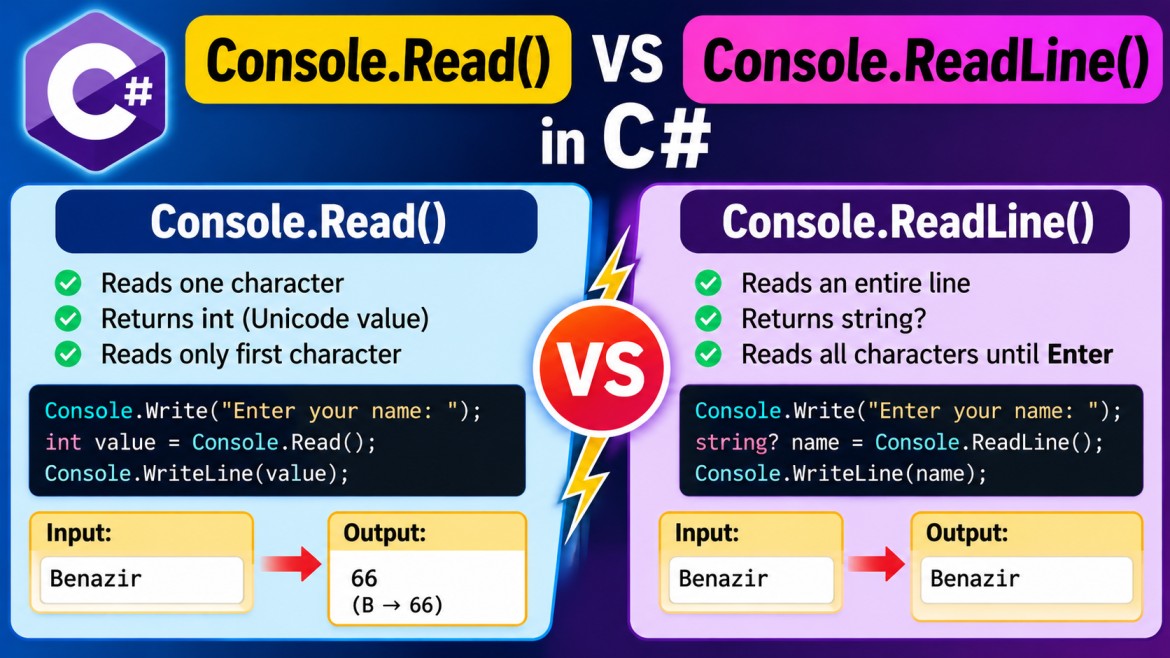


Console.Read() vs Console.ReadLine() in C#
Both Console.Read() and Console.ReadLine() are used to read input from the console, but they differ in how much data they read and what type of value they return.
We will use Benazir as the input throughout.
1. Console.Read()
What is Read()?
Console.Read() reads one character at a time from the console input stream.
Syntax
int value = Console.Read();An important point:
Console.Read()returns anint, not acharorstring.
The integer represents the Unicode numeric value of the character.
2. Example of Read()
Console.Write("Enter your name: ");

int value = Console.Read();

Console.WriteLine(value);
Input:
BenazirOutput:
66Why 66?
Because Read() reads only the first character:
Benazir
↑
B
The Unicode value of uppercase B is:
B → 66So:
int value = Console.Read();stores:
663. Getting the Actual Character
If you want B instead of 66, convert the result to char.
Console.Write("Enter your name: ");

char ch = (char)Console.Read();

Console.WriteLine(ch);
Input:
BenazirOutput:
BThe flow is:
Benazir
   ↓
Console.Read()
   ↓
66
   ↓
(char)66
   ↓
'B'
4. What Happens If We Call Read() Multiple Times?
Read() reads the characters one by one.
int ch1 = Console.Read();
int ch2 = Console.Read();
int ch3 = Console.Read();

Console.WriteLine((char)ch1);
Console.WriteLine((char)ch2);
Console.WriteLine((char)ch3);
Input:
BenazirOutput:
B
e
n
Internally:
Input: Benazir

1st Read() → B
2nd Read() → e
3rd Read() → n
4th Read() → a
5th Read() → z
6th Read() → i
7th Read() → r
Therefore, Read() is useful when you want to process input character by character.
5. Why Does Read() Return int?
This is an important interview question.
You might wonder why Microsoft designed:
int value = Console.Read();instead of:
char value = Console.Read();The reason is that Read() must be able to represent:
- A character value
- A special value indicating end of input
When the end of the input stream is reached:
Console.Read()returns:
-1A char cannot represent -1, so the method returns an int.
Example:
int value = Console.Read();

if (value == -1)
{
    Console.WriteLine("End of input");
}
else
{
    Console.WriteLine((char)value);
}
6. Console.ReadLine()
What is ReadLine()?
Console.ReadLine() reads an entire line of input until the user presses Enter.
Syntax
string? name = Console.ReadLine();Unlike Read():
Read()     → int
ReadLine() → string?
7. Example of ReadLine()
Console.Write("Enter your name: ");

string? name = Console.ReadLine();

Console.WriteLine("Name: " + name);
Input:
BenazirOutput:
Name: BenazirHere, ReadLine() reads all the characters:
B e n a z i r
\___________/
      ↓
   "Benazir"
The complete string is stored in name.
8. What Does ReadLine() Read?
Suppose the user enters:
Benazir Mohamedand presses Enter.
string? name = Console.ReadLine();The variable contains:
"Benazir Mohamed"It reads:
- letters
- numbers
- spaces
- special characters
until the user presses Enter.
9. Does ReadLine() Include Enter?
No.
Suppose the user enters:
Benazir[Enter]ReadLine() returns:
"Benazir"The newline generated by Enter is not included in the returned string.
Conceptually:
B e n a z i r \r \n
\___________/
      ↓
Returned by ReadLine()

\r\n → line ending
10. Reading Numbers with ReadLine()
A very important point is that ReadLine() always reads the input as text.
Suppose:
Console.Write("Enter your age: ");

string? age = Console.ReadLine();
Input:
25The value is:
"25"not:
25In other words:
"25" → string
25   → int
So this is incorrect:
int age = Console.ReadLine(); // Compile-time errorbecause ReadLine() returns string?.
11. Converting ReadLine() to Integer
You can convert the input:
Console.Write("Enter your age: ");

int age = Convert.ToInt32(Console.ReadLine());

Console.WriteLine("Age: " + age);
Input:
25Now:
Keyboard
   ↓
"25"
   ↓
Console.ReadLine()
   ↓
"25"            string
   ↓
Convert.ToInt32()
   ↓
25              int
12. Safer Way — TryParse()
For user input, TryParse() is generally safer.
Console.Write("Enter your age: ");

if (int.TryParse(Console.ReadLine(), out int age))
{
    Console.WriteLine("Age: " + age);
}
else
{
    Console.WriteLine("Invalid age");
}
If the user enters:
25Output:
Age: 25If the user enters:
BenazirOutput:
Invalid ageThis avoids an exception caused by invalid numeric input.
13. Main Difference: Read() vs ReadLine()
| Feature | Console.Read() |
Console.ReadLine() |
|---|---|---|
| Reads | One character | Entire line |
| Return type | int |
string? |
| Input | Benazir |
Benazir |
| Reads | B |
Benazir |
| Returned value | 66 |
"Benazir" |
| Character conversion | (char)Console.Read() |
Not required |
| Stops after | One character | End of line |
| Common usage | Character processing | Normal user input |
14. Side-by-Side Example
Using Read()
Console.Write("Enter name: ");

int value = Console.Read();

Console.WriteLine(value);
Input:
BenazirResult:
66because:
Benazir
↑
B → 66
Using ReadLine()
Console.Write("Enter name: ");

string? value = Console.ReadLine();

Console.WriteLine(value);
Input:
BenazirResult:
Benazir15. Read() Reads from the Input Stream
Technically, Read() reads the next character available in the standard input stream.
Consider:
int first = Console.Read();
int second = Console.Read();

Console.WriteLine((char)first);
Console.WriteLine((char)second);
Input:
BenazirThe input stream can be visualized as:
B  e  n  a  z  i  r
↑
Read()
After the first Read():
B  e  n  a  z  i  r
   ↑
   Next Read()
Therefore:
First Read()  → B
Second Read() → e
16. Mixing Read() and ReadLine()
You should be careful when mixing these methods.
For example:
int ch = Console.Read();

string? name = Console.ReadLine();

Console.WriteLine((char)ch);
Console.WriteLine(name);
If the input is:
Benazirthe first Read() consumes:
BThe remaining input is:
enazirThen ReadLine() reads the remaining characters.
So you may get:
B
enazir
This sometimes causes confusion when learning console input.
17. Read() vs ReadLine() vs ReadKey()
There is another related method:
Console.ReadKey();They should not be confused.
| Method | Reads | Returns |
|---|---|---|
Read() |
One character from input | int |
ReadLine() |
Complete line | string? |
ReadKey() |
One keyboard key | ConsoleKeyInfo |
Example:
Console.WriteLine("Press any key to continue...");

Console.ReadKey();
ReadKey() is commonly used when you want the program to react to a key press.
18. When Should We Use Read()?
Use Read() when you specifically want to process input character by character.
For example:
int value = Console.Read();

char ch = (char)value;

Console.WriteLine(ch);
Input:
BenazirOutput:
BIt is less commonly used for ordinary console application input.
19. When Should We Use ReadLine()?
Use ReadLine() for most normal user input.
Reading name
string? name = Console.ReadLine();Reading city
string? city = Console.ReadLine();Reading age
int age = Convert.ToInt32(Console.ReadLine());Reading salary
decimal salary = Convert.ToDecimal(Console.ReadLine());For typical console programs, ReadLine() is much more commonly used than Read().
20. Interview Questions
Q1. What is the difference between Console.Read() and Console.ReadLine()?
Console.Read() reads one character from the input stream and returns its Unicode numeric value as an int.
Console.ReadLine() reads an entire line and returns it as a string?.
Q2. If I enter Benazir, what does Console.Read() return?
It reads:
Band returns its numeric value:
66To get B:
char ch = (char)Console.Read();Q3. If I enter Benazir, what does Console.ReadLine() return?
"Benazir"as a string.
Q4. Why does Console.Read() return int?
Because it needs to represent both the numeric value of a character and -1 to indicate end of input.
Q5. Does ReadLine() return an integer if the user enters 25?
No.
Input: 25
       ↓
ReadLine()
       ↓
"25" → string
It must be converted:
int age = Convert.ToInt32(Console.ReadLine());Easy Way to Remember
Input = BenazirRead()
Benazir
↑
B
↓
66

Return type → int
ReadLine()
Benazir
\_____/
   ↓
"Benazir"

Return type → string?
So the key interview point is:
Console.Read()reads a single character and returns its numeric value asint, whereasConsole.ReadLine()reads the complete line and returns it asstring?.