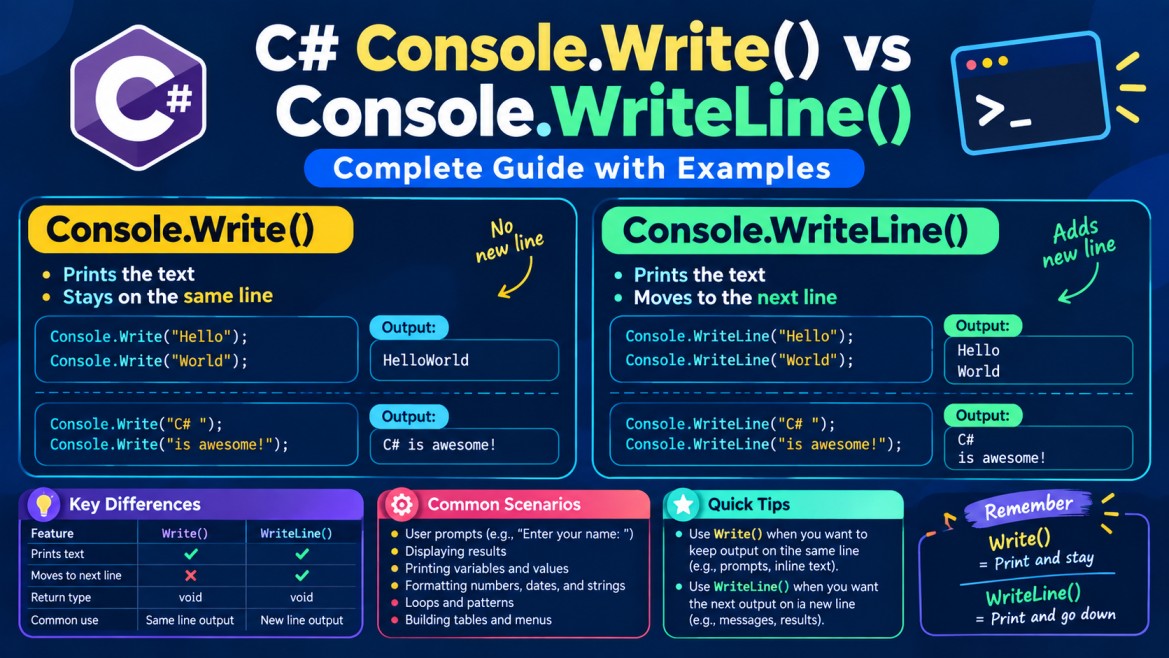


Console.Write() vs Console.WriteLine() in C#
Console.Write() and Console.WriteLine() are used to display output in a console application.
The main difference is very simple:
Console.Write()prints output and keeps the cursor on the same line.Console.WriteLine()prints output and then moves the cursor to the next line.
1. What is Console.Write()?
Console.Write() displays the specified value on the console.
Syntax
Console.Write(value);The important behavior is:
After displaying the value,
Write()does not move the cursor to a new line.
Example
Console.Write("Hello");
Console.Write("Benazir");
Output:
HelloBenazirWhy?
The first statement:
Console.Write("Hello");prints:
Hello
     ↑
     Cursor stays here
Then:
Console.Write("Benazir");starts from the same position.
Therefore:
Hello + Benazir
      ↓
HelloBenazir
2. Adding Space with Write()
Write() doesn't automatically add a space either.
For example:
Console.Write("Hello");
Console.Write("Benazir");
Output:
HelloBenazirIf you want a space:
Console.Write("Hello ");
Console.Write("Benazir");
Output:
Hello BenazirThe space comes from:
"Hello "
       ↑
     space
It is not automatically added by Write().
3. What is Console.WriteLine()?
Console.WriteLine() also displays output on the console.
However, after displaying the output, it moves the cursor to the next line.
Syntax
Console.WriteLine(value);Example:
Console.WriteLine("Hello");
Console.WriteLine("Benazir");
Output:
Hello
Benazir
4. How WriteLine() Works
Consider:
Console.WriteLine("Hello");
Console.WriteLine("Benazir");
The first statement:
Console.WriteLine("Hello");conceptually produces:
Hello
     ↓
Move to next line
So the cursor becomes:
Hello
|
↑
Cursor
The second statement:
Console.WriteLine("Benazir");therefore starts on the next line:
Hello
Benazir
5. Main Difference
Consider these two programs.
Using Write()
Console.Write("Hello");
Console.Write("Benazir");
Output:
HelloBenazirUsing WriteLine()
Console.WriteLine("Hello");
Console.WriteLine("Benazir");
Output:
Hello
Benazir
So:
Write()
   ↓
Print
   ↓
Stay on SAME LINE


WriteLine()
   ↓
Print
   ↓
Move to NEXT LINE
6. Write() Does Not Mean "Write One Word"
This is an important point.
Some beginners think:
Write()writes only one word.
That is not correct.
You can write a complete sentence:
Console.Write("Hello Benazir, Welcome to C# Programming");Output:
Hello Benazir, Welcome to C# ProgrammingThe difference is not how many characters or words it prints.
The difference is what happens after printing.
Write()
→ Prints any supplied value
→ Cursor remains on same line

WriteLine()
→ Prints any supplied value
→ Cursor moves to next line
7. Why Do We Need Write()?
Write() is particularly useful when asking the user for input.
For example:
Console.Write("Enter your name: ");
string? name = Console.ReadLine();

Console.WriteLine("Hello " + name);
Output:
Enter your name: Benazir
Hello Benazir
This looks natural because Write() keeps the cursor after:
Enter your name:So the user types on the same line.
8. What If We Use WriteLine() Instead?
Consider:
Console.WriteLine("Enter your name: ");
string? name = Console.ReadLine();
The console looks like:
Enter your name:
Benazir
This is valid, but often less convenient for prompts.
That's why you commonly see:
Console.Write("Enter your name: ");rather than:
Console.WriteLine("Enter your name: ");9. WriteLine() Can Be Used Without a Value
You can write:
Console.WriteLine();This simply inserts a blank line / line break.
Example:
Console.WriteLine("Hello");
Console.WriteLine();
Console.WriteLine("Benazir");
Output:
Hello

Benazir
The middle:
Console.WriteLine();creates the empty line.
10. Can We Use Write() Without a Value?
No equivalent parameterless Console.Write() is normally used because it would have nothing to output and would not advance the line.
For creating a new line, use:
Console.WriteLine();11. Printing Different Data Types
Both methods can display different types of values.
String
string name = "Benazir";

Console.WriteLine(name);
Output:
BenazirInteger
int age = 25;

Console.WriteLine(age);
Output:
25Decimal
decimal salary = 50000.50m;

Console.WriteLine(salary);
Boolean
bool isActive = true;

Console.WriteLine(isActive);
Output:
TrueSo both methods have overloads that support many data types.
12. Printing Variables
You can print variables directly.
string name = "Benazir";
int age = 25;

Console.WriteLine(name);
Console.WriteLine(age);
Output:
Benazir
25
13. String Concatenation
You can combine text and variables using +.
string name = "Benazir";
int age = 25;

Console.WriteLine("Name: " + name);
Console.WriteLine("Age: " + age);
Output:
Name: Benazir
Age: 25
14. String Interpolation
In modern C#, string interpolation is usually cleaner.
string name = "Benazir";
int age = 25;

Console.WriteLine($"Name: {name}");
Console.WriteLine($"Age: {age}");
Output:
Name: Benazir
Age: 25
The $ allows variables or expressions inside { }.
$"Hello {name}"becomes:
Hello Benazir15. Multiple Values with Formatting
You may also see composite formatting:
string name = "Benazir";
int age = 25;

Console.WriteLine("Name: {0}, Age: {1}", name, age);
Output:
Name: Benazir, Age: 25Here:
{0} → name → Benazir
{1} → age  → 25
For most new code, interpolation is easier to read:
Console.WriteLine($"Name: {name}, Age: {age}");16. Mixing Write() and WriteLine()
You can use both together.
Console.Write("Hello ");
Console.WriteLine("Benazir");
Console.Write("Welcome ");
Console.WriteLine("to C#");
Output:
Hello Benazir
Welcome to C#
Let's understand it.
First:
Console.Write("Hello ");produces:
Hello _The cursor stays there.
Then:
Console.WriteLine("Benazir");produces:
Hello Benazirand moves to the next line.
Then:
Console.Write("Welcome ");produces:
Hello Benazir
Welcome _
Finally:
Console.WriteLine("to C#");produces:
Hello Benazir
Welcome to C#
17. What Actually Creates the New Line?
Conceptually, WriteLine() is similar to:
Write the value
+
Write a line terminator
So:
Console.WriteLine("Hello");can be thought of approximately as:
"Hello" + newlineThe exact newline sequence depends on the operating system/environment.
In .NET, you can represent the environment-specific newline using:
Environment.NewLineFor example:
Console.Write("Hello" + Environment.NewLine);
Console.Write("Benazir");
Output:
Hello
Benazir
This is conceptually similar to:
Console.WriteLine("Hello");
Console.Write("Benazir");
18. Escape Sequence \n
You can also explicitly place a newline inside a string.
Console.Write("Hello\nBenazir");Output:
Hello
Benazir
Notice that we used Write(), but still got two lines.
Why?
Because the string itself contains \n.
Therefore, don't misunderstand the rule:
Write()does not automatically add a newline, but the text passed to it can itself contain newline characters.
19. \n vs WriteLine()
These can produce visually similar output:
Console.Write("Hello\n");
Console.Write("Benazir");
and:
Console.WriteLine("Hello");
Console.Write("Benazir");
Both generally display:
Hello
Benazir
However, for normal console output, prefer:
Console.WriteLine("Hello");when your intention is simply to finish the line.
20. Complete Example with Input and Output
Console.Write("Enter your name: ");
string? name = Console.ReadLine();

Console.Write("Enter your age: ");
int age = Convert.ToInt32(Console.ReadLine());

Console.WriteLine();

Console.WriteLine("User Details");
Console.WriteLine("------------");
Console.WriteLine($"Name: {name}");
Console.WriteLine($"Age: {age}");
Input:
Enter your name: Benazir
Enter your age: 25
Output:
User Details
------------
Name: Benazir
Age: 25
Here, Write() is ideal for the prompts:
Console.Write("Enter your name: ");
Console.Write("Enter your age: ");
because the user enters the value on the same line.
WriteLine() is ideal for displaying the results:
Console.WriteLine($"Name: {name}");
Console.WriteLine($"Age: {age}");
because each result appears on a separate line.
21. Write() vs WriteLine() Comparison
| Feature | Console.Write() |
Console.WriteLine() |
|---|---|---|
| Displays output | Yes | Yes |
| Adds new line automatically | No | Yes |
| Cursor remains on same line | Yes | No |
| Next output starts | Same line | Next line |
| Useful for input prompts | Very common | Less common |
| Useful for normal output | Yes | Very common |
| Can print strings | Yes | Yes |
| Can print numbers | Yes | Yes |
| Can print variables | Yes | Yes |
22. Write vs WriteLine and Read vs ReadLine
Don't confuse the output methods with the input methods.
Output
Console.Write();
Console.WriteLine();
These are used to display data.
Input
Console.Read();
Console.ReadLine();
These are used to receive data.
A simple way to remember:
| Method | Purpose |
|---|---|
Write() |
Output, same line |
WriteLine() |
Output, then next line |
Read() |
Read one character |
ReadLine() |
Read entire line |
23. Very Important Difference
Consider:
Console.Write("Hello");
Console.Write("Benazir");
Output:
HelloBenazirWhereas:
Console.WriteLine("Hello");
Console.WriteLine("Benazir");
Output:
Hello
Benazir
And:
Console.Write("Hello ");
Console.WriteLine("Benazir");
Output:
Hello BenazirThis third example is especially useful for understanding that WriteLine() moves to the next line after printing its own value.
24. Common Interview Questions
Q1. What is Console.Write()?
Console.Write() writes a value to the standard output stream without automatically moving the cursor to the next line.
Q2. What is Console.WriteLine()?
Console.WriteLine() writes a value to the standard output stream and then terminates the current line, so subsequent output begins on the next line.
Q3. What is the difference between Write() and WriteLine()?
Write() keeps subsequent output on the same line, whereas WriteLine() moves subsequent output to the next line.
Q4. Can Write() display multiple words?
Yes.
Console.Write("Hello Benazir Welcome to C#");Write() is not limited to one word or one character.
Q5. Can Write() print output on multiple lines?
Yes, if you explicitly include newline characters.
Console.Write("Hello\nBenazir");Output:
Hello
BenazirQ6. What does an empty Console.WriteLine() do?
Console.WriteLine();It writes only a line terminator, effectively moving the cursor to the next line.
25. Easy Way to Remember
Console.Write()
      ↓
Write output
      ↓
Don't add newline
      ↓
Next output → SAME LINE
Example:
Console.Write("Hello");
Console.Write("Benazir");HelloBenazirWhereas:
Console.WriteLine()
        ↓
Write output
        ↓
Add newline
        ↓
Next output → NEXT LINE
Example:
Console.WriteLine("Hello");
Console.WriteLine("Benazir");
Hello
BenazirKey Interview Point
Console.Write()writes output without automatically terminating the current line, whileConsole.WriteLine()writes output and then adds a line terminator, causing subsequent output to begin on the next line.