

Stack and Queue in C# – Complete Guide
Stack<T> and Queue<T> are generic collections available in the System.Collections.Generic namespace. Both store multiple elements, but they differ in how elements are inserted and removed.
1. Stack in C#
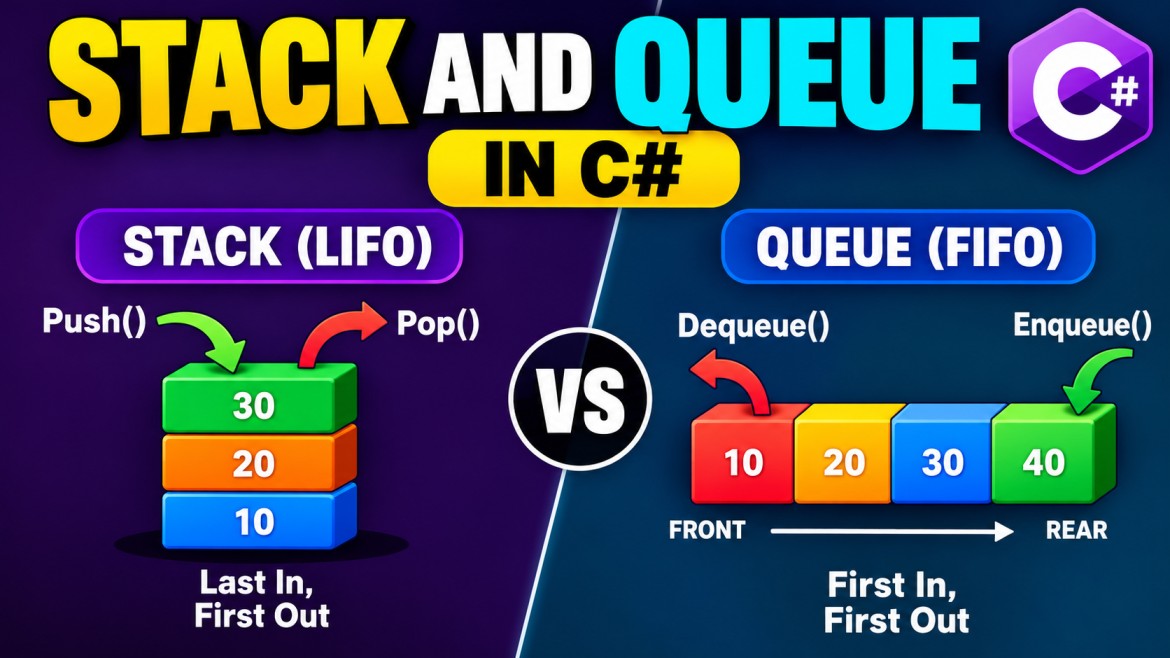
A Stack follows the LIFO (Last In, First Out) principle. The last element added is the first element removed.
Real-time example: A stack of plates. The last plate placed on top is the first plate taken out.
Stack diagram
         STACK (LIFO)

          ┌──────────┐
 TOP ---> │    30    │  ← Pop() removes 30
          ├──────────┤
          │    20    │
          ├──────────┤
          │    10    │
          └──────────┘

Push(40) → Adds 40 on top
Pop()    → Removes 40
Peek()   → Returns top element
Stack example
Stack<int> stack = new Stack<int>();

// Add elements
stack.Push(10);
stack.Push(20);
stack.Push(30);

// View top element
Console.WriteLine(stack.Peek()); // 30

// Remove top element
Console.WriteLine(stack.Pop());  // 30

// Count elements
Console.WriteLine(stack.Count);  // 2
Important Stack methods
|
Method |
Description |
|---|---|
|
|
Adds an element to the top |
|
|
Removes and returns the top element |
|
|
Returns the top element without removing |
|
|
Safely attempts to remove an element |
|
|
Safely attempts to read the top element |
|
|
Checks whether an element exists |
|
|
Removes all elements |
|
|
Returns the number of elements |
Important: Pop() and Peek() throw InvalidOperationException when the stack is empty.
2. Queue in C#
A Queue follows the FIFO (First In, First Out) principle. The first element added is the first element removed.
Real-time example: Customers standing in a bank queue. The customer who arrives first is served first.
Queue diagram
              QUEUE (FIFO)

FRONT                            REAR
  ↓                               ↓
┌──────┬──────┬──────┬──────┐
│  10  │  20  │  30  │  40  │
└──────┴──────┴──────┴──────┘
  ↓                               ↑
Dequeue()                      Enqueue()

Dequeue() → Removes 10
Enqueue(50) → Adds 50 at rear
Peek()    → Returns 10
Queue example
Queue<int> queue = new Queue<int>();

// Add elements
queue.Enqueue(10);
queue.Enqueue(20);
queue.Enqueue(30);

// View first element
Console.WriteLine(queue.Peek());    // 10

// Remove first element
Console.WriteLine(queue.Dequeue()); // 10

// Count elements
Console.WriteLine(queue.Count);     // 2
Important Queue methods
|
Method |
Description |
|---|---|
|
|
Adds an element at the rear |
|
|
Removes and returns the first element |
|
|
Returns the first element without removing |
|
|
Safely attempts to remove an element |
|
|
Safely attempts to read the first element |
|
|
Checks whether an element exists |
|
|
Removes all elements |
|
|
Returns the number of elements |
3. Stack vs Queue – Key Differences
|
Feature |
Stack |
Queue |
|---|---|---|
|
Principle |
LIFO |
FIFO |
|
Insertion |
|
|
|
Removal |
|
|
|
Read next element |
|
|
|
Removal order |
Last inserted first |
First inserted first |
|
Real-world example |
Stack of plates |
Bank customer queue |
|
Common use |
Undo, backtracking |
Job processing, scheduling |
|
Time complexity |
O(1) push/pop |
O(1) enqueue/dequeue amortized |
4. Real-Time Scenario – Stack (Undo Operation)
A text editor uses a stack to maintain previous actions for undo functionality.
Stack<string> undoStack = new();

undoStack.Push("Typed Hello");
undoStack.Push("Typed World");
undoStack.Push("Deleted Word");

// Undo last action
Console.WriteLine(undoStack.Pop());

// Output: Deleted Word
Explanation: The most recent action is undone first. This is why a Stack is suitable for implementing undo functionality.
5. Real-Time Scenario – Queue (Order Processing)
An e-commerce application processes customer orders in the order they arrive.
Queue<string> orders = new();

orders.Enqueue("Order-101");
orders.Enqueue("Order-102");
orders.Enqueue("Order-103");

while (orders.Count > 0)
{
    string order = orders.Dequeue();

    Console.WriteLine($"Processing {order}");
}
Output:
Processing Order-101
Processing Order-102
Processing Order-103
Explanation: The first order received is processed first. A Queue is useful for FIFO processing.
6. Important Interview Questions
Q1. What is the difference between Stack and Queue?
Stack follows LIFO, whereas Queue follows FIFO. Stack removes the most recently added element, while Queue removes the earliest added element.
Q2. Are Stack and Queue thread-safe?
No. Stack<T> and Queue<T> are not thread-safe for concurrent modifications. Use ConcurrentStack<T> and ConcurrentQueue<T> when multiple threads need concurrent access.
Q3. What happens when Pop() or Dequeue() is called on an empty collection?
Both throw InvalidOperationException. Use TryPop() or TryDequeue() to avoid exceptions.
Q4. What is the time complexity of Stack and Queue?
Stack Push/Pop operations are O(1). Queue Enqueue is amortized O(1), and Dequeue is O(1).
Q5. Can Stack and Queue store different data types?
Generic collections are strongly typed. For example, Stack<int> stores integers and Queue<string> stores strings. Stack<object> can store mixed types, but sacrifices type safety.
Q6. When should we use Stack and Queue in real-time applications?
Use Stack for undo/redo, expression evaluation, and backtracking. Use Queue for order processing, background jobs, and request buffering.
Interview key point: Stack = LIFO (Push/Pop), Queue = FIFO (Enqueue/Dequeue). Both are fundamental data structures, and understanding their ordering behavior is more important than memorizing their methods.