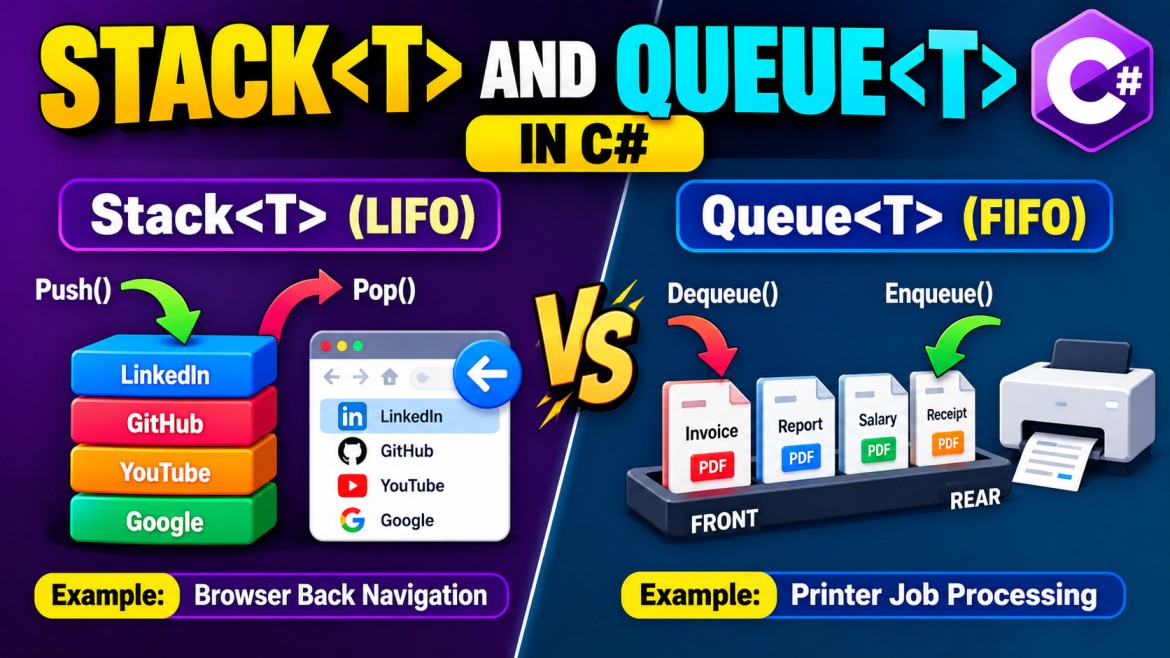


Stack<T> and Queue<T> in C# – Different Real-Time Examples
1. Stack<T> – Browser Back Navigation
Scenario: A web browser maintains a history of visited pages. When the user clicks the Back button, the most recently visited page is retrieved first.
Stack<string> browserHistory = new();

browserHistory.Push("Google");
browserHistory.Push("YouTube");
browserHistory.Push("GitHub");
browserHistory.Push("LinkedIn");

// Current page
Console.WriteLine(browserHistory.Peek());

// Go back
browserHistory.Pop();

Console.WriteLine(browserHistory.Peek());
Output:
LinkedIn
GitHub
Execution flow:
Browser History (LIFO)

      ┌──────────────┐
TOP → │ LinkedIn     │ ← Current Page
      ├──────────────┤
      │ GitHub       │
      ├──────────────┤
      │ YouTube      │
      ├──────────────┤
      │ Google       │
      └──────────────┘

Back Button → Pop()

LinkedIn removed
GitHub becomes current page
Key points:
-
Push()adds a visited page. -
Pop()removes the current page from the stack. -
Peek()retrieves the current page without removing it. -
Stack follows LIFO.
2. Queue<T> – Printer Job Processing
Scenario: Multiple employees send documents to a printer. The printer processes jobs in the order they were received.
Queue<string> printJobs = new();

printJobs.Enqueue("Invoice.pdf");
printJobs.Enqueue("Report.pdf");
printJobs.Enqueue("Salary.pdf");
printJobs.Enqueue("Receipt.pdf");

while (printJobs.Count > 0)
{
    string document = printJobs.Dequeue();

    Console.WriteLine($"Printing: {document}");
}
Output:
Printing: Invoice.pdf
Printing: Report.pdf
Printing: Salary.pdf
Printing: Receipt.pdf
Execution flow:
Printer Queue (FIFO)

FRONT                               REAR
  ↓                                  ↓
┌─────────┬────────┬────────┬─────────┐
│ Invoice │ Report │ Salary │ Receipt │
└─────────┴────────┴────────┴─────────┘
    ↓                            ↑
 Dequeue()                    Enqueue()

First received → First printed
Key points:
-
Enqueue()adds a print job. -
Dequeue()removes the oldest pending job. -
Peek()checks the next job without removing it. -
Queue follows FIFO.
3. Quick Interview Comparison
|
Scenario |
Collection |
Reason |
|---|---|---|
|
Browser back navigation |
|
Last visited page first |
|
Recursive backtracking |
|
Last saved state first |
|
Printer job processing |
|
First submitted job first |
|
Customer support tickets |
|
First received ticket first |
|
Breadth-first search (BFS) |
|
Processes nodes in FIFO order |
|
Depth-first search (DFS) |
|
Processes most recently added node first |
Interview tip: Use Stack<T> when the most recently added item must be processed first. Use Queue<T> when items must be processed in their arrival order.